


RPM Remote Print Manager LPD Print Server
RPM Remote Print Manager® (RPM) is feature-packed, Windows-based LPD printing software solution designed expressly for Windows® platforms. RPM installs on all Window's platforms giving you the power to customize & control processing of print jobs received over a TCP/IP network.
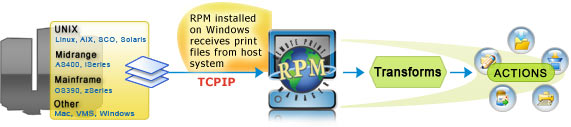
RPM opens the door to TCP/IP printing without the additional costs of expensive hardware printers or hardware network setups. RPM has been tested through time and 1000's of satisfied users, you'll have the most up-to-date software for your print management but will not have the overhead and maintenance upkeep.
RPM allows you to easily print your files to disc for easy file storage or file manipulation. When printing to file (from a mainframe or any host system), RPM includes duplicate filename handling, filenames using job data such as date and time, user, job title, etc., plus options identified by key third-party integrators.
RPM Main Page | Feature Overview
RPM has 3 Types of Printing Queues
Text Queue
RPM provides text formatting not found in any other print server. The text queue supports printing from the host system to unsupported PC print devices. Text printing sets RPM apart from all LPD products.
Raw Queue
RPM passes raw information from the host system to the PC print queue. RPM processes print data without modification as if the printer was connected directly to the host system through a parallel or serial connection.
Filter Queue
Incoming data can written to a file for archiving or other purposes. RPM checks for duplicate filenames before saving and has many file naming options. RPM can be configured to open print data in other applications such as word processors, spreadsheets, or other programs.
Please visit the main site to read more about RPM Print Queues.
Hard-to-find Network Printing Features
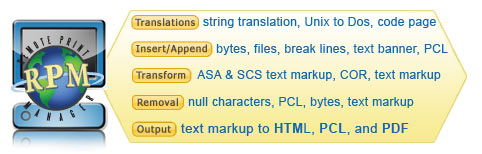
Customize your print jobs before they reach the printer. RPM allows you to receive the spool file from a host or mainframe and customize the output on your PC, before sending it to the printer. RPM offers numerous ways of customizing print data. The following features all have real-world use and most of them were suggested to us over the years from RPM users.
- Automatically create a print queue when a job is received, reducing network administration time by eliminating the need to search for misnamed queues.
- Easily translate and convert text from different formats. Translate EBCDIC data, ASA carriage control codes, or convert SCS to ASCII for all queue types. In text mode, SCS formatting is preserved, including font changes and character positioning.
- Administrator Tools - The system administrator can completely hide RPM from the user minimizing user interaction and errors. The administrator can easily unhide RPM to do any configuration or maintenance as needed.
- UNIX Printing - RPM follows the established UNIX printing model of using named queues to represent distinct processing requirements. Each queue you created in RPM is fully configurable, and independent from every other queue. This means that a queue specifies actual processing, as well as the name of a printer or port.
- Easy configuration for fitting text output to any size paper. Support all fonts the printer can use. A variety of host data formats enable end-users to print without host system modifications.
- Remote Administration RPM Elite includes a web browser interface called Remote Print Administrator (RPA). RPA was designed to provide administrators the ability to remotely manage software configuration and monitor job processing. This feature provides comprehensive management of queues, jobs, and other settings. The log can also be viewed remotely.
- Provides Multiple-Byte Character Sets (MBSC) for use in international languages such as Japanese, Korean, and Chinese
- Supports three printing queue types: text print queue, raw print queue, and filter print queue. Unlimited print queue definitions accommodate routine and special printing needs. Customize data before printing. Transmit raw or pre-formatted files to any Windows printer.
- Installed Code Page - Users can easily select appropriate code page to use when printing. RPM can use any code page currently installed on the PC.
- Extensive logging in RPM provides each message in an easy to read format. Each log message shows a unique RPM event number, the time, the source of the message, the application that generated the message, and the message text. RPM can be configured to log only a minimal amount of messages or high detail messages.
|